Github SSH key Setup
Requirements
- Surely a github account :nerd_face:
- A Mac/Linux/Windows or Android devices (Yes, I once had my Android device setup for pushing little changes when I couldn't get my PC) :grin:
- Internet Connection :relieved:
- Little knowledge of the Terminal (Command Line) :yum:
As Kanye West said:
We're living the future so the present is our past.
Alright Let's Go
Step One : Checking For Existing SSH Keys
Linux, Mac & Windows(Git Bash)
First, we're gonna check if there's an existing SSH key on your device. NOTE: If you're sure you don't have existing SSH keys you can skip this step to the next one.
Open Terminal
Ctrl + Alt + T
Enter the following command to see if existing SSH keys are present
ls -al ~/.ssh
It'll list the files in this directory if they exist. If a count instead is shown or no files you can move to step two
Expected Output
id_rsa.pub
id_ecdsa.pub
id_ed25519.pub
If you already have and wish to use then, skip step 2 and continue from step 3. But if you wish to not use any already available to connect to github you can continue with step 2.
Step 2: Generating SSH Keys
Linux, Mac & Windows(Git Bash)
Type or paste the command below intor your terminal, replace your_email@example.com with your Github email address.
ssh-keygen -t rsa -b 4096 -C "your_email@example.com"
Press "Enter" when prompted "Enter a file in which to save the key". Doing this accepts the default location.
Enter a file in which to save the key(/home/you/.ssh/id_rsa): [Press Enter]
At the next prompt type a secure password and confirm it by typing it again on the next prompt
Enter passphrase (empty for no passphrase): [Type a passphrase]
Enter same passphrase again: [Type passphrase again]
Step 3 Adding SSH key to the ssh-agent
Linux & Windows(Git Bash)
Start the ssh-agent in the background
eval "$(ssh-agent -s)"
Result: But could be a different number
Agent pid 67068
Add your ssh private key to the ssh-agent.
ssh-add ~/.ssh/id_rsa
Mac
Start the ssh-agent in the background
eval "$(ssh-agent -s)"
Result: But could be a different number
Agent pid 59068
NOTE: For macOS Sierra 10.12.2 or later Modify your (~/.ssh/config) file to automatically load keys into the ssh-agent and store passphrases in your keychain.
- First check to see if your ~/.ssh/config file exists in the default location
open ~/.ssh/config
If you get
The file /Users/you/.ssh/config does not exist
Then create the file.
touch ~/.ssh/config
Open it and modify the file.
Host *
    AddKeysToAgent yes
    UseKeyChain yes
    IdentityFile ~/.ssh/id_rsa
Add your ssh private key to the ssh-agent.
ssh-add ~/.ssh/id_rsa
If for professional purposes or personal purposes, you created the key with a different name, replace id_rsa with the name of the private key file.
Step 4: Adding SSH key to your Github Account
Copy the SSH key to your clipboard REMINDER: If your SSH key file has a different name, modify the filename to match your setup. No new line or whitespace are allowed.
MAC
pbcopy < ~/.ssh/id_rsa.pub
Linux
To Check for latest drivers and update
sudo apt-get update sudo apt-get upgrade -y
Install xclip and copy the contents
sudo apt-get install xclip xclip -sel clip < ~/.ssh/id_rsa.pub
Windows
clip < ~/.ssh/id_rsa.pub
General
ALL COMMANDS ARE NOW DONE.
Login your Github on a browser
Navigate to Settings
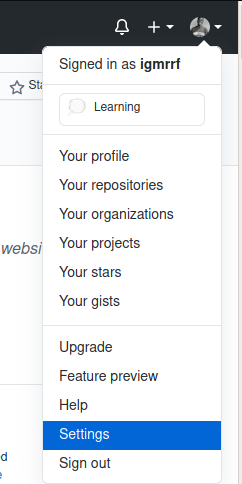
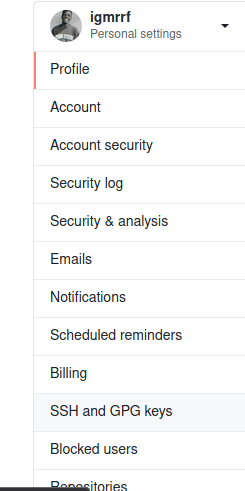
Select SSH and GPG keys
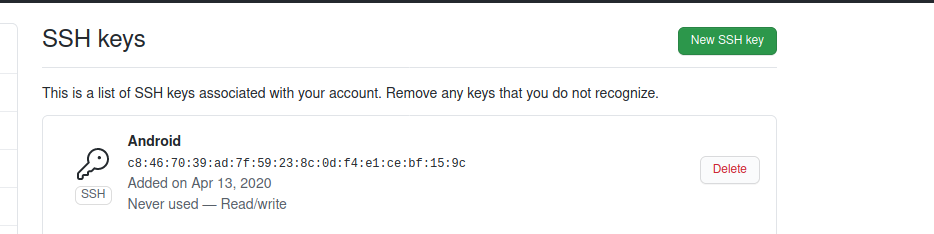
Click New SSH keys
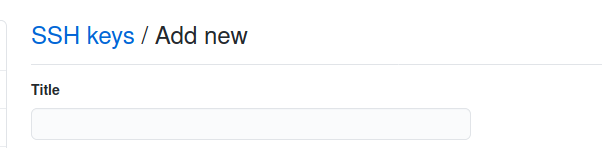
In the Title field, add a descriptive label for the new key
Finally paste your key into the Key Field and click add
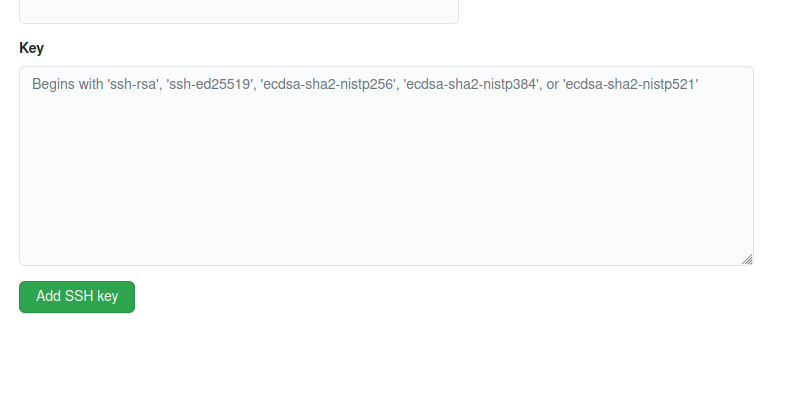
Now you can go back to your terminal and clone, push, pull and run every other Git command without having to repeatedly input your GITHUB details
Extra Note: When try to perform a Git command from an Editors or IDE for the first time, you might be asked to input the passphrase use in creating the SSH key.
You can either allow it once or allow it until you choose to remove the SSH Key from Github
NULL_RECORDS // No data found
Resolving "react exit with code 0" when running a React container
A guide on diagnosing and fixing the common "react exit with code 0" error when running React applications inside Docker containers.
Fixing Failed NPM TEST on Default Ember Boilerplate on Linux
A guide for Linux users on resolving issues with the default Ember test process that expects Chrome to be installed.